Ever wonder about that mysterious Content-Type tag? You know, the one you're supposed to put in HTML and you never quite know what it should be?
Did you ever get an email from your friends in Bulgaria with the subject line "???? ?????? ??? ????"?

I've been dismayed to discover just how many software developers aren't really completely up to speed on the mysterious world of character sets, encodings, Unicode, all that stuff. A couple of years ago, a beta tester for
FogBUGZ was wondering whether it could handle incoming email in Japanese. Japanese? They have email in Japanese? I had no idea. When I looked closely at the commercial ActiveX control we were using to parse MIME email messages, we discovered it was doing exactly the wrong thing with character sets, so we actually had to write heroic code to undo the wrong conversion it had done and redo it correctly. When I looked into another commercial library, it, too, had a completely broken character code implementation. I corresponded with the developer of that package and he sort of thought they "couldn't do anything about it." Like many programmers, he just wished it would all blow over somehow.
But it won't. When I discovered that the popular web development tool PHP has almost
complete ignorance of character encoding issues, blithely using 8 bits for characters, making it darn near impossible to develop good international web applications, I thought,
enough is enough.
So I have an announcement to make: if you are a programmer working in 2003 and you don't know the basics of characters, character sets, encodings, and Unicode, and I catch you, I'm going to punish you by making you peel onions for 6 months in a submarine. I swear I will.
And one more thing:
IT'S NOT THAT HARD.
In this article I'll fill you in on exactly what every working programmer should know. All that stuff about "plain text = ascii = characters are 8 bits" is not only wrong, it's hopelessly wrong, and if you're still programming that way, you're not much better than a medical doctor who doesn't believe in germs. Please do not write another line of code until you finish reading this article.
Before I get started, I should warn you that if you are one of those rare people who knows about internationalization, you are going to find my entire discussion a little bit oversimplified. I'm really just trying to set a minimum bar here so that everyone can understand what's going on and can write code that has a hope of working with text in any language other than the subset of English that doesn't include words with accents. And I should warn you that character handling is only a tiny portion of what it takes to create software that works internationally, but I can only write about one thing at a time so today it's character sets.
A Historical Perspective
The easiest way to understand this stuff is to go chronologically.
You probably think I'm going to talk about very old character sets like EBCDIC here. Well, I won't. EBCDIC is not relevant to your life. We don't have to go that far back in time.

Back in the semi-olden days, when Unix was being invented and K&R were writing
The C Programming Language, everything was very simple. EBCDIC was on its way out. The only characters that mattered were good old unaccented English letters, and we had a code for them called
ASCIIwhich was able to represent every character using a number between 32 and 127. Space was 32, the letter "A" was 65, etc. This could conveniently be stored in 7 bits. Most computers in those days were using 8-bit bytes, so not only could you store every possible ASCII character, but you had a whole bit to spare, which, if you were wicked, you could use for your own devious purposes: the dim bulbs at WordStar actually turned on the high bit to indicate the last letter in a word, condemning WordStar to English text only. Codes below 32 were called
unprintable and were used for cussing. Just kidding. They were used for control characters, like 7 which made your computer beep and 12 which caused the current page of paper to go flying out of the printer and a new one to be fed in.
And all was good, assuming you were an English speaker.

Because bytes have room for up to eight bits, lots of people got to thinking, "gosh, we can use the codes 128-255 for our own purposes." The trouble was,
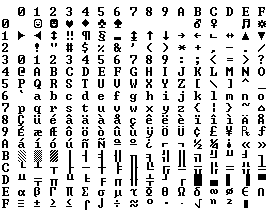
lots of people had this idea at the same time, and they had their own ideas of what should go where in the space from 128 to 255. The IBM-PC had something that came to be known as the OEM character set which provided some accented characters for European languages and
a bunch of line drawing characters... horizontal bars, vertical bars, horizontal bars with little dingle-dangles dangling off the right side, etc., and you could use these line drawing characters to make spiffy boxes and lines on the screen, which you can still see running on the 8088 computer at your dry cleaners'. In fact as soon as people started buying PCs outside of America all kinds of different OEM character sets were dreamed up, which all used the top 128 characters for their own purposes. For example on some PCs the character code 130 would display as é, but on computers sold in Israel it was the Hebrew letter Gimel (

), so when Americans would send their résumés to Israel they would arrive as
rsums. In many cases, such as Russian, there were lots of different ideas of what to do with the upper-128 characters, so you couldn't even reliably interchange Russian documents.
Eventually this OEM free-for-all got codified in the ANSI standard. In the ANSI standard, everybody agreed on what to do below 128, which was pretty much the same as ASCII, but there were lots of different ways to handle the characters from 128 and on up, depending on where you lived. These different systems were called
code pages. So for example in Israel DOS used a code page called 862, while Greek users used 737. They were the same below 128 but different from 128 up, where all the funny letters resided. The national versions of MS-DOS had dozens of these code pages, handling everything from English to Icelandic and they even had a few "multilingual" code pages that could do Esperanto and Galician
on the same computer! Wow! But getting, say, Hebrew and Greek on the same computer was a complete impossibility unless you wrote your own custom program that displayed everything using bitmapped graphics, because Hebrew and Greek required different code pages with different interpretations of the high numbers.
Meanwhile, in Asia, even more crazy things were going on to take into account the fact that Asian alphabets have thousands of letters, which were never going to fit into 8 bits. This was usually solved by the messy system called DBCS, the "double byte character set" in whichsome letters were stored in one byte and others took two. It was easy to move forward in a string, but dang near impossible to move backwards. Programmers were encouraged not to use s++ and s-- to move backwards and forwards, but instead to call functions such as Windows' AnsiNext and AnsiPrev which knew how to deal with the whole mess.
But still, most people just pretended that a byte was a character and a character was 8 bits and as long as you never moved a string from one computer to another, or spoke more than one language, it would sort of always work. But of course, as soon as the Internet happened, it became quite commonplace to move strings from one computer to another, and the whole mess came tumbling down. Luckily, Unicode had been invented.
Unicode
Unicode was a brave effort to create a single character set that included every reasonable writing system on the planet and some make-believe ones like Klingon, too. Some people are under the misconception that Unicode is simply a 16-bit code where each character takes 16 bits and therefore there are 65,536 possible characters. This is not, actually, correct. It is the single most common myth about Unicode, so if you thought that, don't feel bad.
In fact, Unicode has a different way of thinking about characters, and you have to understand the Unicode way of thinking of things or nothing will make sense.
Until now, we've assumed that a letter maps to some bits which you can store on disk or in memory:
A -> 0100 0001
In Unicode, a letter maps to something called a code point which is still just a theoretical concept. How that code point is represented in memory or on disk is a whole nuther story.
In Unicode, the letter A is a platonic ideal. It's just floating in heaven:
A
This platonic A is different than B, and different from a, but the same as A and A and A. The idea that A in a Times New Roman font is the same character as the A in a Helvetica font, but different from "a" in lower case, does not seem very controversial, but in some languages just figuring out what a letter is can cause controversy. Is the German letter ß a real letter or just a fancy way of writing ss? If a letter's shape changes at the end of the word, is that a different letter? Hebrew says yes, Arabic says no. Anyway, the smart people at the Unicode consortium have been figuring this out for the last decade or so, accompanied by a great deal of highly political debate, and you don't have to worry about it. They've figured it all out already.
Every platonic letter in every alphabet is assigned a magic number by the Unicode consortium which is written like this:
U+0639. This magic number is called a
code point. The U+ means "Unicode" and the numbers are hexadecimal.
U+0639 is the Arabic letter Ain. The English letter A would be
U+0041. You can find them all using the
charmap utility on Windows 2000/XP or visiting
the Unicode web site.
There is no real limit on the number of letters that Unicode can define and in fact they have gone beyond 65,536 so not every unicode letter can really be squeezed into two bytes, but that was a myth anyway.
OK, so say we have a string:
Hello
which, in Unicode, corresponds to these five code points:
U+0048 U+0065 U+006C U+006C U+006F.
Just a bunch of code points. Numbers, really. We haven't yet said anything about how to store this in memory or represent it in an email message.
Encodings
That's where encodings come in.
The earliest idea for Unicode encoding, which led to the myth about the two bytes, was, hey, let's just store those numbers in two bytes each. So Hello becomes
00 48 00 65 00 6C 00 6C 00 6F
Right? Not so fast! Couldn't it also be:
48 00 65 00 6C 00 6C 00 6F 00 ?
Well, technically, yes, I do believe it could, and, in fact, early implementors wanted to be able to store their Unicode code points in high-endian or low-endian mode, whichever their particular CPU was fastest at, and lo, it was evening and it was morning and there were already
two ways to store Unicode. So the people were forced to come up with the bizarre convention of storing a FE FF at the beginning of every Unicode string; this is called a
Unicode Byte Order Mark and if you are swapping your high and low bytes it will look like a FF FE and the person reading your string will know that they have to swap every other byte. Phew. Not every Unicode string in the wild has a byte order mark at the beginning.

For a while it seemed like that might be good enough, but programmers were complaining. "Look at all those zeros!" they said, since they were Americans and they were looking at English text which rarely used code points above U+00FF. Also they were liberal hippies in California who wanted to conserve (sneer). If they were Texans they wouldn't have minded guzzling twice the number of bytes. But those Californian wimps couldn't bear the idea of doubling the amount of storage it took for strings, and anyway, there were already all these doggone documents out there using various ANSI and DBCS character sets and who's going to convert them all? Moi? For this reason alone most people decided to ignore Unicode for several years and in the meantime things got worse.
Thus was
invented the brilliant concept of
UTF-8. UTF-8 was another system for storing your string of Unicode code points, those magic U+ numbers, in memory using 8 bit bytes. In UTF-8, every code point from 0-127 is stored
in a single byte. Only code points 128 and above are stored using 2, 3, in fact, up to 6 bytes.

This has the neat side effect that English text looks exactly the same in UTF-8 as it did in ASCII, so Americans don't even notice anything wrong. Only the rest of the world has to jump through hoops. Specifically, Hello, which was U+0048 U+0065 U+006C U+006C U+006F, will be stored as 48 65 6C 6C 6F, which, behold! is the same as it was stored in ASCII, and ANSI, and every OEM character set on the planet. Now, if you are so bold as to use accented letters or Greek letters or Klingon letters, you'll have to use several bytes to store a single code point, but the Americans will never notice. (UTF-8 also has the nice property that ignorant old string-processing code that wants to use a single 0 byte as the null-terminator will not truncate strings).
So far I've told you
three ways of encoding Unicode. The traditional store-it-in-two-byte methods are called UCS-2 (because it has two bytes) or UTF-16 (because it has 16 bits), and you still have to figure out if it's high-endian UCS-2 or low-endian UCS-2. And there's the popular new UTF-8
standard which has the nice property of also working respectably if you have the happy coincidence of English text and braindead programs that are completely unaware that there is anything other than ASCII.
There are actually a bunch of other ways of encoding Unicode. There's something called UTF-7, which is a lot like UTF-8 but guarantees that the high bit will always be zero, so that if you have to pass Unicode through some kind of draconian police-state email system that thinks 7 bits are quite enough, thank you it can still squeeze through unscathed. There's UCS-4, which stores each code point in 4 bytes, which has the nice property that every single code point can be stored in the same number of bytes, but, golly, even the Texans wouldn't be so bold as to waste that much memory.
And in fact now that you're thinking of things in terms of platonic ideal letters which are represented by Unicode code points, those unicode code points can be encoded in any old-school encoding scheme, too! For example, you could encode the Unicode string for Hello (U+0048 U+0065 U+006C U+006C U+006F) in ASCII, or the old OEM Greek Encoding, or the Hebrew ANSI Encoding, or any of several hundred encodings that have been invented so far, with one catch: some of the letters might not show up! If there's no equivalent for the Unicode code point you're trying to represent in the encoding you're trying to represent it in, you usually get a little question mark: ? or, if you'rereally good, a box. Which did you get? -> �
There are hundreds of traditional encodings which can only store
somecode points correctly and change all the other code points into question marks. Some popular encodings of English text are Windows-1252 (the Windows 9x standard for Western European languages) and
ISO-8859-1, aka Latin-1 (also useful for any Western European language). But try to store Russian or Hebrew letters in these encodings and you get a bunch of question marks. UTF 7, 8, 16, and 32 all have the nice property of being able to store
any code point correctly.
The Single Most Important Fact About Encodings
If you completely forget everything I just explained, please remember one extremely important fact. It does not make sense to have a string without knowing what encoding it uses. You can no longer stick your head in the sand and pretend that "plain" text is ASCII.
There Ain't No Such Thing As Plain Text.
If you have a string, in memory, in a file, or in an email message, you have to know what encoding it is in or you cannot interpret it or display it to users correctly.
Almost every stupid "my website looks like gibberish" or "she can't read my emails when I use accents" problem comes down to one naive programmer who didn't understand the simple fact that if you don't tell me whether a particular string is encoded using UTF-8 or ASCII or ISO 8859-1 (Latin 1) or Windows 1252 (Western European), you simply cannot display it correctly or even figure out where it ends. There are over a hundred encodings and above code point 127, all bets are off.
How do we preserve this information about what encoding a string uses? Well, there are standard ways to do this. For an email message, you are expected to have a string in the header of the form
Content-Type: text/plain; charset="UTF-8"
For a web page, the original idea was that the web server would return a similar Content-Type http header along with the web page itself -- not in the HTML itself, but as one of the response headers that are sent before the HTML page.
This causes problems. Suppose you have a big web server with lots of sites and hundreds of pages contributed by lots of people in lots of different languages and all using whatever encoding their copy of Microsoft FrontPage saw fit to generate. The web server itself wouldn't really know what encoding each file was written in, so it couldn't send the Content-Type header.
It would be convenient if you could put the Content-Type of the HTML file right in the HTML file itself, using some kind of special tag. Of course this drove purists crazy... how can you read the HTML file until you know what encoding it's in?! Luckily, almost every encoding in common use does the same thing with characters between 32 and 127, so you can always get this far on the HTML page without starting to use funny letters:
<meta http-equiv="Content-Type" content="text/html; charset=utf-8">
But that meta tag really has to be the very first thing in the section because as soon as the web browser sees this tag it's going to stop parsing the page and start over after reinterpreting the whole page using the encoding you specified.
What do web browsers do if they don't find any Content-Type, either in the http headers or the meta tag? Internet Explorer actually does something quite interesting: it tries to guess, based on the frequency in which various bytes appear in typical text in typical encodings of various languages, what language and encoding was used. Because the various old 8 bit code pages tended to put their national letters in different ranges between 128 and 255, and because every human language has a different characteristic histogram of letter usage, this actually has a chance of working. It's truly weird, but it does seem to work often enough that naïve web-page writers who never knew they needed a Content-Type header look at their page in a web browser and it looks ok, until one day, they write something that doesn't exactly conform to the letter-frequency-distribution of their native language, and Internet Explorer decides it's Korean and displays it thusly, proving, I think, the point that Postel's Law about being "conservative in what you emit and liberal in what you accept" is quite frankly not a good engineering principle. Anyway, what does the poor reader of this website, which was written in Bulgarian but appears to be Korean (and not even cohesive Korean), do? He uses the View | Encoding menu and tries a bunch of different encodings (there are at least a dozen for Eastern European languages) until the picture comes in clearer. If he knew to do that, which most people don't.

For the latest version of
CityDesk, the web site management software published by
my company, we decided to do everything internally in UCS-2 (two byte) Unicode, which is what Visual Basic, COM, and Windows NT/2000/XP use as their native string type. In C++ code we just declare strings as
wchar_t ("wide char") instead of
char and use the
wcs functions instead of the
str functions (for example
wcscatand
wcslen instead of
strcat and
strlen). To create a literal UCS-2 string in C code you just put an L before it as so:
L"Hello".
When CityDesk publishes the web page, it converts it to UTF-8 encoding, which has been well supported by web browsers for many years. That's the way all
29 language versions of
Joel on Software are encoded and I have not yet heard a single person who has had any trouble viewing them.
This article is getting rather long, and I can't possibly cover everything there is to know about character encodings and Unicode, but I hope that if you've read this far, you know enough to go back to programming, using antibiotics instead of leeches and spells, a task to which I will leave you now.
Next:
Want to know more?
You’re reading
Joel on Software, stuffed with years and years of completely raving mad articles about software development, managing software teams, designing user interfaces, running successful software companies, and rubber duckies.
About the author.
I’m
Joel Spolsky, co-founder of
Fog Creek Software, a
New York company that proves that you can treat programmers well and still be highly profitable. Programmers get private offices, free lunch, and work 40 hours a week. Customers only pay for software if they’re delighted. We make FogBugz, an enlightened
bug tracking and software development tool, Kiln, a distributed
source control system that will blow your socks off if you’re stuck on Subversion, and Fog Creek Copilot, which makes
remote desktop access easy. I’m also the co-founder of
Stack Overflow.
REFERENCES


 Support web developers in testing web resources for accessibility features.
 AiOS lets you open various windows as sidebar panels, and quickly switch between them. So it put an end to the window chaos! In addition to bookmarks and history it opens dialogues such as downloads, add-ons and more in the sidebar.
 Easy cache status & management from status.
 Advanced Eyedropper, ColorPicker, Gradient Generator and other colorful goodies.
 Console² (pronounced Console Squared or Console Two) replaces the JavaScript Console with what could be the next generation Error Console. From v0.5 includes the Console Filter extension previously available separately from the Console² website.
 Video and audio encoding for Firefox. With Firefogg you can encode most media files to Ogg and WebM. Firefogg also provides an API to integrate encoding into the upload process.
 FireFTP is a free, secure, cross-platform FTP/SFTP client for Mozilla Firefox which provides easy and intuitive access to FTP/SFTP servers.
 Display horizontal and vertical floating guides, exactly the way you use it in photoshop. Helps improving layout, placing elements in proper grids, laying out elements symmetrically and structure a design.
 FoxyProxy is an advanced proxy management tool that completely replaces Firefox’s limited proxying capabilities. It offers more features than SwitchProxy, ProxyButton, QuickProxy, xyzproxy, ProxyTex, TorButton, etc.
 Customize the way a web page displays or behaves, by using small bits of JavaScript.
 HTML Validator is a Mozilla extension that adds HTML validation inside Firefox and Mozilla. The number of errors of a HTML page is seen on the form of an icon.
 An HTTP analyzer addon for Firefox.
 Automate Firefox. Record and replay repetitious work. If you love the Firefox web browser, but are tired of repetitive tasks like visiting the same sites every days, filling out forms, and remembering passwords, then iMacros for Firefox is the solution you’ve been dreaming of!
 Monitor Jenkins (
 jQuery and jQuery UI embedded in browser.
 Pretty-prints JSON content in the browser for easy, unobtrusive viewing.
 View JSON documents in the browser.
 If the website you are viewing contains any external js/css files, an icon will appear that says “SS”, “JS”, or both. Each individual file can then be viewed by clicking on the filename. The file will be opened in a new window.
 View HTTP headers of a page and while browsing.
 LiveReload refreshes a web page when files change.
 Draw a ruler across any webpage to check the width, height, or alignment of page elements in pixels.
 The best security you can get in a web browser! Allow active content to run only from sites you trust, and protect yourself against XSS and Clickjacking attacks.
 PixelZoomer takes a screenshot of the current website and provides various tools for pixel analysis. You can zoom into websites (up to 3200%), measure distances and pick colors with an eye dropper.
 Grabbing screens and pulling images from the web just got a bit easier. With the Pixlr Grabber add-on, you can copy, save, share or even edit your final grabs – including any image or background – with just a right-click.
 Allows quick enable and disable of Java, Javascript, Flash, Silverlight, Images, Stylesheets and Proxy from the Statusbar and/or Toolbar without having to open any dialogs!
 Color tools for web development. Color picker and eyedropper + saving colors and trying out colors with drag and drop.
 Testing tool for regular expressions with color highlighting (including submatches) and helpers for creating expressions.
 A very simple extension to remove all the cookies of currently opened site. It adds an option to the Right Click menu of the page, and a Clear Cookies Button to perform this operation. It displays the status of operation in the status bar.
 Capture, grab, save, download, or copy anything you see in your web browser with only one click! Screenshot pimp is by far the most customizable, and user friendly screenshot toolbar available for both Windows and Mac!
 Manage any SQLite database on your computer.
 Just one simple toolbar button to open Selenium IDE. You need to have installed Selenium IDE:
  Seoquake is a Firefox SEO extension aimed primarily at helping web masters who deal with search engine optimization (SEO), social media optimization (SMO) and internet promotion. Seoquake allows to investigate many important SEO parameters.
 Show the IP address(es) of the current page in the status bar. It also allows querying custom information services by IP (right click) and hostname (left click), like whois, netcraft, etc. Additionally you can copy the IP address to the clipboard.
 Restyle the web with Stylish, a user styles manager. Stylish lets you easily install themes and skins for Google, Facebook, YouTube, Orkut, and many, many other sites. You can even customize Firefox and other programs themselves.
 You can have an idea, with a single click, of how accesible web sites are.
 A
A  Perform many different validations in one go. This multiple validator works with external, internal, or local web pages using a local copy of the desktop tool obtained from
 TryAgain keeps trying to load a webpage when the server cannot be reached.
 The User Agent Switcher extension adds a menu and a toolbar button to switch the user agent of a browser.
 The Web Developer extension adds various web developer tools to a browser.
 Syntax highlighting for the Firebug command line using Ace. Fuzzy auto completion.
 Firebug extension to view which CSS rules are actually used.
 Firecookie is an extension for Firebug that makes possible to view and manage cookies in your browser.
 Finds HTML elements matching chosen CSS selector(s) or XPath expression.
 FirePHP enables you to log to your Firebug Console using a simple PHP method call.
 Firebug plugin for jQuery development.
 Inline Code Finder is an add-on to Firebug, to be able to find HTML elements with any of these issues: Inline JavaScript events, Inline style, javascript: links.
 Javascript syntax highlighting for Firebug.
 Pixel Perfect is a Firefox/Firebug extension that allows web developers and designers to easily overlay a web composition over top of the developed HTML.
 YSlow analyzes web pages and why they’re slow based on Yahoo!’s rules for high performance web sites.