Showing posts with label wget. Show all posts

Tuesday, July 24, 2012

wget vs curl: How to Download Files Using wget and curl

SkyHi @ Tuesday, July 24, 2012

Question: I typically use wget to download files. On some systems, wget is not installed and only curl is available. Can you explain me with a simple example on how I can download a remote file using curl? Are there any difference between curl and wget?
Answer: On a high-level, both wget and curl are command line utilities that do the same thing.
  • They both can be used to download files using FTP and HTTP(s).
  • You can also send HTTP POST request using curl and wget
  • However curl provides APIs that can be used by programmers inside their own code. curl uses libcurl which is a cross-platform library.
  • wget is just a command-line tool without any APIs.
  • Curl also supports lot more protocols that wget doesn’t support. For example: SCP, SFTP, TFTP, TELNET, LDAP(S), FILE, POP3, IMAP, SMTP, RTMP and RTSP.
  • There is a major advantage of using wget. wget supports recursive download, while curl doesn’t.

Wget Examples

The following example downloads the file and stores in the same name as the remote server.
wget http://www.openss7.org/repos/tarballs/strx25-0.9.2.1.tar.bz2
The following example download the file and stores in a different name than the remote server. This is helpful when the remote URL doesn’t contain the file name in the url as shown in the example below.
wget -O taglist.zip http://www.vim.org/scripts/download_script.php?src_id=7701

Curl Examples

$ curl -O http://www.openss7.org/repos/tarballs/strx25-0.9.2.1.tar.bz2
  % Total    % Received % Xferd  Average Speed   Time    Time     Time  Current
                                 Dload  Upload   Total   Spent    Left  Speed
 28 3762k   28 1085k    0     0  72771      0  0:00:52  0:00:15  0:00:37 54267
Option -O (upper-case O) is important. Without this, curl will start dumping the downloaded file on the stdout. Using -O, it downloads the files in the same name as the remote server. In the above example, we are downloading strx25-0.9.2.1.tar.bz2, so the downloaded file will also be the same name.
Instead of -O, you an also specify, “–remote-name” as shown below. Both are the same.


$ curl --remote-name http://www.openss7.org/repos/tarballs/strx25-0.9.2.1.tar.bz2
While curl is downloading it gives the following useful information:
  • % – The total % of the download that was completed as of now. When it gets to 100% the download is completed. In the above example, it has downloaded only 28% of the file.
  • Total – The total size of the file
  • Received – The total size of the file that was has been downloaded so far. In the above example, it has downloaded 1085k so far (out of 3762k total)
  • Xferd – This will be used when you upload some files to the remote server. During upload, this will indicate the total size of the file that has been uploaded so far. Since we are downloading a file, in this example, this is 0.
  • Average Speed Dload – This indicates the average download speed.
  • AVerage Speed Upload – While uploading a file, this will indicate the average upload speed
  • Time Total – This indicates the total time it will take to download (or upload) the whole file based on the current download (or upload) speed. In this example, it will take approximately a total of 52 seconds to download this file.
  • Time Spend – The time curl has spent so far downloading (or uploading) the file. In this example, it has spent 15 seconds so far.
  • Time Left – This is caculated based on “Time Total” – “Time Spent”.
  • Current Speed – This indicates the current download/upload speed. Compare this with Average Spped Dload/UPload to see how fast or slow your system is downloading currently.
If you want to download the file and store it in a different name than the name of the file in the remote server, use -o (lower-case o) as shown below. This is helpful when the remote URL doesn’t contain the file name in the url as shown in the example below.
$  curl -o taglist.zip http://www.vim.org/scripts/download_script.php?src_id=7701
  % Total    % Received % Xferd  Average Speed   Time    Time     Time  Current
                                 Dload  Upload   Total   Spent    Left  Speed
100 50243  100 50243    0     0   170k      0 --:--:-- --:--:-- --:--:--  400k
In the above example, there is no file name in the remote URL, it just calls a php script that passes some parameter to it. However, the file will be downloaded and saved as taglist.zip on your local system. Instead of -o, you an also specify, “–output”.

Use curl to download a file from sourceforge (mirror)

Posted April 6th @ 8:09 by Werner
Sometimes one wants to download a source package or similar from sourceforge with curl and not with the browser, e.g. in a script where one wants to download a package automatically. It turns out, that due the latest changes in the download system of sourceforge this is not straightforward.
Assume you want to download the binutils binary package from the MinGW project. If you go to the download site of binutils and click on “direct link” you get “http://downloads.sourceforge.net/project/mingw/GNU%20Binutils/binutils-2.20.1/binutils-2.20.1-2-mingw32-bin.tar.gz”. If you just use “curl -O URL” nothing happens. Adding the option “-v” some more output is shown:
* About to connect() to downloads.sourceforge.net port 80 (#0)
*   Trying 216.34.181.59... connected
* Connected to downloads.sourceforge.net (216.34.181.59) port 80 (#0)
> GET /project/mingw/GNU%20Binutils/binutils-2.20.1/binutils-2.20.1-2-mingw32-bin.tar.gz HTTP/1.1
> User-Agent: curl/7.16.4 (i386-apple-darwin9.0) libcurl/7.16.4 OpenSSL/0.9.7l zlib/1.2.3
> Host: downloads.sourceforge.net
> Accept: */*
>
< HTTP/1.1 302 Found
< X-Powered-By: PHP/5.2.9
< Content-Disposition: attachment; filename="binutils-2.20.1-2-mingw32-bin.tar.gz"
< Location: http://surfnet.dl.sourceforge.net/project/mingw/GNU%20Binutils/binutils-2.20.1/binutils-2.20.1-2-mingw32-bin.tar.gz
< Content-type: text/html
< Content-Length: 0
< Date: Tue, 06 Apr 2010 18:50:34 GMT
< Server: lighttpd/1.4.26
<
* Connection #0 to host downloads.sourceforge.net left intact
* Closing connection #0
Sourceforge redirects to a mirror server, but curl doesn’t follow it. Fortunately the “-L” option tells curl to follow this redirection. So
curl -L -O http://downloads.sourceforge.net/project/mingw/GNU%20Binutils/binutils-2.20.1/binutils-2.20.1-2-mingw32-bin.tar.gz
works. This sourceforge trac ticket provided the information. Additionally it’s possible to shorten the URL a bit. Instead of the long URL above you could also use:
http://downloads.sourceforge.net/sourceforge/mingw/binutils-2.20.1-2-mingw32-bin.tar.gz
Ok, it’s not that much shorter but still. I’m not sure if this always works, at least for MinGW packages it does.


REFERENCES

Tuesday, March 15, 2011

Wget not working with brackets what shall i do ?

SkyHi @ Tuesday, March 15, 2011
Escape your parentheses:
wget ...Life-of-imam-Ali\(a.s\)/part1.wmv

Monday, December 20, 2010

Windows wget

SkyHi @ Monday, December 20, 2010

wget is a great command line utility that is natively available in Linux and can be downloaded for Windows (see also GNU WGet for Windows (Windows 7, Vista, XP, etc.)). wget can be used for many download situations including large files, recursive downloads, non-interactive downloads, multiple file downloads, etc.


Note: options ARE case sensitive.


1. Download a single file with wget using no options.

wget http://ftp.gnu.org/gnu/wget/wget-latest.tar.gz
While downloading, wget will display a progress bar with the following information:

  • % of download completion
  • Download progress in bytes
  • Current download speed
  • Estimated time remaining
Download in progress


Completed download


2. Download a file saving with a different name using wget -O

wget http://www.vim.org/scripts/download_script.php?src_id=7701
Even though the downloaded file is in zip format, it will be saved with the name download_script.php?src_id=7701 without the -O switch.


To modify this behavior specify the output file name using the -O option.

wget -O taglist.zip http://www.vim.org/scripts/download_script.php?src_id=7701
3. Specify download speed / download rate Using wget –limit-rate


While executing the wget, by default it will try to use all possible bandwidth. You can limit the download speed using the –limit-rate switch.

wget --limit-rate=200k http://ftp.gnu.org/gnu/wget/wget-latest.tar.gz
4. Restart a download which stopped in the middle using wget -c.

wget -c http://ftp.gnu.org/gnu/wget/wget-latest.tar.gz
5. Download in the background with wget -b

wget -b http://ftp.gnu.org/gnu/wget/wget-latest.tar.gz


The download will begin and give back the shell prompt to you. You can always check the status of the download using tail -f  (Linux only) .

tail -f wget-log
6. Mask user agent and display wget like browser using wget –user-agent


Some websites can disallow you to download its page by identifying that the user agent is not a browser. So you can mask the user agent by using –user-agent options and show wget like a browser.

wget --user-agent="Mozilla/5.0 (X11; U; Linux i686; en-US; rv:1.9.0.3) Gecko/2008092416 Firefox/3.0.3" http://ftp.gnu.org/gnu/wget/wget-latest.tar.gz
7. Test URL using wget –spider.  This will test that the file exists, but not perform the download.

wget --spider http://ftp.gnu.org/gnu/wget/wget-latest.tar.gz


8. Increase total number of retry attempts using wget –tries.

wget --tries=75 http://ftp.gnu.org/gnu/wget/wget-latest.tar.gz
9. Download multiple files / URLs using wget -i


First, store all the download files or URLs in a text file:

URL1

URL2

URL3

URL4


Next, give the download-file-list.txt as argument to wget using -i option.

wget -i download-file-list.txt
10. Download a full website using wget –mirror

wget --mirror -p --convert-links -P ./LOCAL-DIR WEBSITE-URL
  • –mirror: enable mirroring
  • -p: download all files that are necessary to properly display a given HTML page
  • –convert-link: after the download, convert the links in document for local viewing
  • -P ./LOCAL-DIR: save all the files and directories to the specified directory
11. Skip certain file types while downloading using wget –reject.  In order to download all content except .gif images use the following.

wget --reject=gif WEBSITE-TO-BE-DOWNLOADED
12. Log messages to a log file instead of stderr using wget -o.  To redirect output to a log file instead of the terminal.

wget -o download.log DOWNLOAD-URL
13. Quit downloading when certain size is exceeded using wget -Q.

wget -Q5m -i FILE-WHICH-HAS-URLS
14. Download only certain file types using wget -r -A


You can use this for the following situations

  • Download all images from a website
  • Download all videos from a website
  • Download all PDF files from a website
wget -r -A.pdf http://url-to-webpage-with-pdfs/
15. You can use wget to perform FTP downloads.

wget ftp-url
FTP download using wget with username and password authentication.

wget --ftp-user=USERNAME --ftp-password=PASSWORD DOWNLOAD-URL
Note: username and password can be used for HTTP and HTTPS downloads as well using --http-user=USER, --http-password=PASS respectively.

REFERENCES
http://www.powercram.com/2010/01/how-to-use-wget-includes-several.html

Saturday, November 13, 2010

Howto: Use wget Recursively Download All FTP Directories

SkyHi @ Saturday, November 13, 2010
I would like to copy all of my files and directories from UNIX server to Linux workstation. How do I use wget command to recursively download whole FTP directories stored at /home/tom/ from ftp.example.com to local directory called /home/tom/backup?

GNU Wget is a free Linux / UNIX utility for non-interactive download of files from the Web or and FTP servers, as well as retrieval through HTTP proxies. GNU/wget has been designed for robustness over slow dialup internet or unstable network connections. If a download fails due to a network problem, it will keep retrying until the whole file has been retrieved. If the server supports regetting, it will instruct the server to continue the download from where it left off.

wget Recursive Example

You can use the -r ( recursive retrieving ) option as follows. You can also pass your ftp username and password to the wget command. First, make a backup directory in your $HOME directory:
mkdir ~/backup/
cd ~/backup/
Now, use wget command as follows:
 
wget -r ftp://username:password@ftp.example.com/
wget -r ftp://tom:myPassword@ftp.example.com/home/tom/
wget -r ftp://tom:myPassword@ftp.example.com/var/www/

wget recursive ftp with mirroring option

The -m option turns on mirroring i.e. it turns on recursion and time-stamping, sets infinite recursion depth and keeps FTP directory listings:
wget -m ftp://username:Password@ftp.example.com/
wget -m ftp://username:Password@ftp.example.com/var/www/html
 
REFERENCES
http://www.cyberciti.biz/faq/wget-recursive-download-command/ 

Tuesday, June 15, 2010

wget extract url from a file

SkyHi @ Tuesday, June 15, 2010
if we were to try the same thing on the output of
Code:
lynx --dump URL>somefile
i.e. something w/o html tags; further assuming the potential presence of more than one URL per line, could we use
Code:
sed 's/http/\^http/g' somefile | tr -s "^" "\n" | grep http| sed 's/\ .*//g'
http://farm2.static.flickr.com/0ooo6/1o0574e9f_o.jpg"
http://farm3.static.flickr.com/6oo1/2coo3a_b.jpg"

#cut -f1 -d '"' somefile
Then #wget :) for i in `cat file.txt` do wget $i done

OR Windows SW:
http://wareseeker.com/download/gurus-URL-Grabber-1.0.rar/8038104


REFERENCES
http://forums.macosxhints.com/showthread.php?t=13457

Thursday, April 22, 2010

wget: Download entire websites easy

SkyHi @ Thursday, April 22, 2010


wget is a nice tool for downloading resources from the internet. The basic usage is
wget url:


wget http://linuxreviews.org/


Therefore,
wget (manual page) +
less (manual page)
is all you need to surf the internet. The power of wget is
that you may download sites recursive, meaning you also get all pages (and images and other data) linked on the front page:


wget -r http://linuxreviews.org/


But many sites do not want you to download their entire site. To prevent this, they check how browsers identify. Many sites refuses you to connect or sends a blank page if they detect you are not using a web-browser. You might get a message like:


Sorry, but the download manager you are using to view this site is not supported. We do not support use of such download managers as flashget, go!zilla, or getright


Wget has a very handy -U option for sites like this. Use -U My-browser to tell the site you are using some commonly accepted browser:


  wget  -r -p -U Mozilla http://www.stupidsite.com/restricedplace.html


The most important command line options are --limit-rate= and --wait=. You should add --wait=20 to pause 20 seconds between retrievals, this makes sure you are not manually added to a blacklist. --limit-rate defaults to bytes, add K to set KB/s. Example:


wget --wait=20 --limit-rate=20K -r -p -U Mozilla http://www.stupidsite.com/restricedplace.html


A web-site owner will probably get upset if you attempt to download his entire site using a simple wget http://foo.bar command. However, the web-site owner will not even notice you if you limit the download transfer rate and pause between fetching files.


Use --no-parent


--no-parent is a very handy option that guarantees wget will not download anything from the folders beneath the folder you want to acquire. Use this to make sure wget does not fetch more than it needs to if just just want to download the files in a folder.


REFERENCE
http://linuxreviews.org/quicktips/wget/

Saturday, January 16, 2010

Wget Trick to Download from Restrictive Sites

SkyHi @ Saturday, January 16, 2010

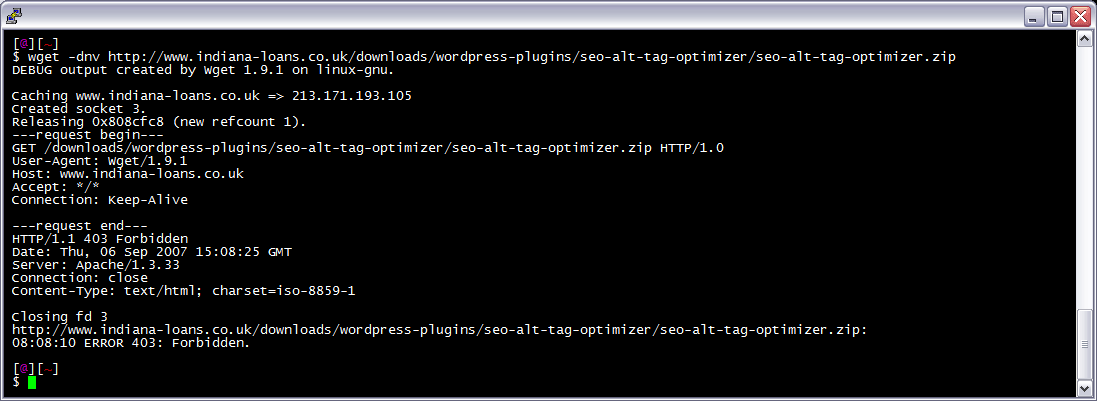
Before
wget 403 Forbidden
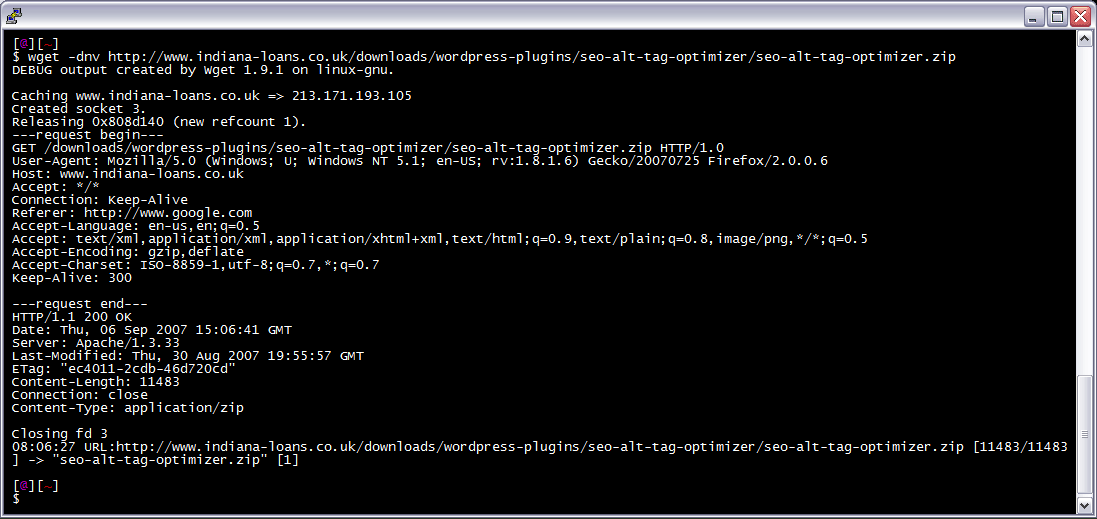
After trick
wget bypassing restrictions
I am often logged in to my servers via SSH, and I need to download a file like a WordPress plugin. I’ve noticed many sites now employ a means of blocking robots like wget from accessing their files. Most of the time they use .htaccess to do this. So a permanent workaround has wget mimick a normal browser.


Update

function wgets()
{
wget --referer="http://www.google.com" --user-agent="Mozilla/5.0 (Windows; U; Windows NT 5.1; en-US; rv:1.8.1.6) Gecko/20070725 Firefox/2.0.0.6" \
--header="Accept:text/xml,application/xml,application/xhtml+xml,text/html;q=0.9,text/plain;q=0.8,image/png,*/*;q=0.5" \
--header="Accept-Language: en-us,en;q=0.5" \
--header="Accept-Encoding: gzip,deflate" \
--header="Accept-Charset: ISO-8859-1,utf-8;q=0.7,*;q=0.7" \
--header="Keep-Alive: 300" "$@"
}

Using alias

Add this to your .bash_profile or other shell startup script, or just type it at the prompt. Now just run wget from the command line as usual, i.e. wget -dnv http://www.askapache.com/sitemap.xml.

alias wget='wget --referer="http://www.google.com" --user-agent="Mozilla/5.0 (Windows; U; Windows NT 5.1; en-US; rv:1.8.1.6) Gecko/20070725 Firefox/2.0.0.6" --header="Accept:<br />text/xml,application/xml,application/xhtml+xml,text/html;q=0.9,text/plain;q=0.8,image/png,*/*;q=0.5" --header="Accept-Language: en-us,en;q=0.5" --header="Accept-Encoding: gzip,deflate"<br />--header="Accept-Charset: ISO-8859-1,utf-8;q=0.7,*;q=0.7" --header="Keep-Alive: 300"'<br />

Using custom .wgetrc

Alternatively, you could instead just create or modify your $HOME/.wgetrc file like this. Or download and rename to .wgetrc.wgetrc. Now just run wget from the command line as usual, i.e. wget -dnv http://www.askapache.com/sitemap.xml.

###<br />### Sample Wget initialization file .wgetrc by http://www.askapache.com<br />###<br />##<br />## Local settings (for a user to set in his $HOME/.wgetrc).  It is<br />## *highly* undesirable to put these settings in the global file, since<br />## they are potentially dangerous to "normal" users.<br />##<br />## Even when setting up your own ~/.wgetrc, you should know what you<br />## are doing before doing so.<br />##<br /> <br />header = Accept-Language: en-us,en;q=0.5<br />header = Accept: text/xml,application/xml,application/xhtml+xml,text/html;q=0.9,text/plain;q=0.8,image/png,*/*;q=0.5<br />header = Accept-Encoding: gzip,deflate<br />header = Accept-Charset: ISO-8859-1,utf-8;q=0.7,*;q=0.7<br />header = Keep-Alive: 300<br />user_agent = Mozilla/5.0 (Windows; U; Windows NT 5.1; en-US; rv:1.8.1.6) Gecko/20070725 Firefox/2.0.0.6<br />referer = http://www.google.com<br />

From the command line

wget --referer="http://www.google.com" --user-agent="Mozilla/5.0 (Windows; U; Windows NT 5.1; en-US; rv:1.8.1.6) Gecko/20070725 Firefox/2.0.0.6" --header="Accept:<br />text/xml,application/xml,application/xhtml+xml,text/html;q=0.9,text/plain;q=0.8,image/png,*/*;q=0.5" --header="Accept-Language: en-us,en;q=0.5" --header="Accept-Encoding: gzip,deflate"<br />--header="Accept-Charset: ISO-8859-1,utf-8;q=0.7,*;q=0.7" --header="Keep-Alive: 300" -dnv http://www.askapache.com/sitemap.xml<br /><br /><br />Reference: <a href="http://www.askapache.com/dreamhost/wget-header-trick.html">http://www.askapache.com/dreamhost/wget-header-trick.html</a><br />

REFERENCE
http://www.askapache.com/dreamhost/wget-header-trick.html

WGet all the way

SkyHi @ Saturday, January 16, 2010

There are a couple of security auditing frameworks out there, and the temptation is high on creating your own; either in Perl, Ruby, Python and why not in PHP as well.

Needles to say, I too was tempted in creating my own framework. Ideas kept flowing in, the project has been started and then BAM, I’ve read an interesting article on GNUCITIZEN, which made me rethink my strategy…

One of the comments pointed it out very well:

most of the stuff we need is on the shell already. pentesting frameworks is like the new security-testing hype. first we had hundreds of portscanners, then hundreds of webapp MiTM proxies, then hundreds of fuzzers, then hundreds of SQL injectors, now it’s about pentesting frameworks :)

So instead of starting to write redundant code, I started to learn already available command line tools, which have years of development behind and fill in almost every aspect they need to.

Basically I’m building my framework around already available tools, and only code up things that do not exist, or for some very particular cases.

So why WGet?

Well I had to start with something my series of articles (it’s gonna be a series), and wget seemed to be a good starting point.

If you’ve never dealt with wget (which I sincerely doubt), the following description best describes it:

GNU Wget is a free software package for retrieving files using HTTP, HTTPS and FTP, the most widely-used Internet protocols. It is a non-interactive commandline tool, so it may easily be called from scripts, cron jobs, terminals without X-Windows support, etc

Without further useless rambling let’s see in which scenarios you would use wget; apart from downloading psyBNC archives, like seen on many h4×00r websites.


Geek to Live: Mastering Wget

SkyHi @ Saturday, January 16, 2010

Your browser does a good job of fetching web documents and displaying them, but there are times when you need an extra strength download manager to get those tougher HTTP jobs done.

A versatile, old school Unix program called Wget is a highly hackable, handy little tool that can take care of all your downloading needs. Whether you want to mirror an entire web site, automatically download music or movies from a set of favorite weblogs, or transfer huge files painlessly on a slow or intermittent network connection, Wget's for you.

Wget, the "non-interactive network retriever," is called at the command line. The format of a Wget command is:

wget [option]... [URL]...

The URL is the address of the file(s) you want Wget to download. The magic in this little tool is the long menu of options available that make some really neat downloading tasks possible. Here are some examples of what you can do with Wget and a few dashes and letters in the [option] part of the command.

Mirror an entire web site

Say you want to backup your blog or create a local copy of an entire directory of a web site for archiving or reading later. The command:

wget -m http://ginatrapani.googlepages.com

Will save the two pages that exist on the ginatrapani.googlepages.com site in a folder named just that on your computer. The -m in the command stands for "mirror this site."

Say you want to retrieve all the pages in a site PLUS the pages that site links to. You'd go with:

wget -H -r --level=1 -k -p http://ginatrapani.googlepages.com

This command says, "Download all the pages (-r, recursive) on http://ginatrapani.googlepages.com plus one level (—level=1) into any other sites it links to (-H, span hosts), and convert the links in the downloaded version to point to the other sites' downloaded version (-k). Oh yeah, and get all the components like images that make up each page (-p)."

Warning: Beware, those with small hard drives! This type of command will download a LOT of data from sites that link out a lot (like blogs)! Don't try to backup the Internet, because you'll run out of disk space!

Resume large file downloads on a flaky connection

Say you're piggybacking the neighbor's wifi and every time someone microwaves popcorn you lose the connection, and your video download (naughty you!) keeps crapping out halfway through. Direct Wget to resume partial downloads for big files on intermittent connections.

To set Wget to resume an interrupted download of this 16MB "Mavericks Surf Highlights 2006: Wipeouts" short from Google Video, use:

wget -c --output-document=mavericks.avi "http://vp.video.google.com/videodownload?version=0&secureurl=qgAAAJCWpcRd5eI2k3sm3LWJZMjLyLFiTxk_KqUrRYbrzLTEw8hwMV30m3MRz6rYMTxGqWIfWMQjNJsP0fNXUMc34jzoPcy6z-qHde5UVD29Po6_9b_-d3J5AQpVROUPRqzkJriangEl2IMkKBJd08Q7TTJIAC_r6XID-fNYPLKHm1KRvx0smOslivNLGmyZsCsZmVNVN0jaw5-dloWtzPlI86zIubh1XvJsTg2u_YaHcaAB&sigh=-BbV2h_bIFVuVg4D-h6MUTxuErM&begin=0&len=139433&docid=6059494448346363884"

(Apologies for the humungous, non-wrapping URL.)

The -c ("continue") option sets Wget to resume a partial download if the transfer is interrupted. You'll also notice the URL is in quotes, necessary for any address with &'s in it. Also, since that URL is so long, you can specify the name of the output file explicitly - in this case, mavericks.avi.

Schedule hourly downloads of a file

The nice thing about any command line script is that it's very easy to automate. For instance, if there was a constantly-changing file that you wanted to download every hour, say, you could use cron or Windows Task Scheduler and Wget to do just that, or if there was a very large file you wanted your computer to fetch in the middle of the night while you slept instead of right this moment when you need all your bandwidth to get other work done. You could easily schedule the Wget command to run at a later time.

As proof of concept, yesterday I scheduled an hourly download of Lifehacker's daily traffic chart to run automatically. The command looked like this:

wget --output-document=traffic_$(date +\%Y\%m\%d\%H).gif "http://sm3.sitemeter.com/rpc/v6/server.asp?a=GetChart&n=9&p1=sm3lifehacker&p2=&p3=3&p4=0&p5=64\%2E249\%2E116\%2E138&p6=HTML&p7=1&p8=\%2E\%3Fa\%3Dstatistics&p9=&rnd=7209"

Notice the use of %Y and %m datetime parameters which result in unique filenames, so each hour the command wouldn't overwrite the file with the same name generated the hour before. Note also that the %'s have to be escaped with a backslash.

Just for fun I threw together a little animated gif of the hourly chart image, that displays the movement of Lifehacker's traffic yesterday from 2PM to midnight:

Automatically download music

This last technique, suggested by Jeff Veen, is by far my favorite use of Wget. These days there are tons of directories, aggregators, filters and weblogs that point off to interesting types of media. Using Wget, you can create a text file list of your favorite sites that say, link to MP3 files, and schedule it to automatically download any newly-added MP3's from those sites each day or week.

First, create a text file called mp3_sites.txt, and list URLs of your favorite sources of music online one per line (like http://del.icio.us/tag/system:filetype:mp3 or stereogum.com). Be sure to check out my previous feature on how to find free music on the web for more ideas.

Then use the following Wget command to go out and fetch those MP3's:

wget -r -l1 -H -t1 -nd -N -np -A.mp3 -erobots=off -i mp3_sites.txt

That Wget recipe recursively downloads only MP3 files linked from the sites listed in mp3_sites.txt that are newer than any you've already downloaded. There are a few other specifications in there - like to not create a new directory for every music file, to ignore robots.txt and to not crawl up to the parent directory of a link. Jeff breaks it all down in his original post.

The great thing about this technique is that once this command is scheduled, you get an ever-rotating jukebox of new music Wget fetches for you while you sleep. With a good set of trusted sources, you'll never have to go looking for new music again - Wget will do all the work for you.

Install Wget

Wanna give all this a try? Windows users, you can download Wget here; Mac users, go here. An alternative for Windows users interested in more Linuxy goodness is to download and install the Unix emulator Cygwin which includes Wget and a whole slew of other 'nixy utilities, too.

For the full take on all of Wget's secret options sauce, type wget --help or check out the full-on Wget manual online. No matter what your downloading task may be, some combination of Wget's extensive options will get the job done just right.


Reference: http://lifehacker.com/161202/geek-to-live--mastering-wget


using wget to grab all images from a web page

SkyHi @ Saturday, January 16, 2010

the command

  • wget -A.jpg -r -l1 -np http://www.mentallandscape.com/C_CatalogMoon.htm

explanation

  • -A: accept list. in this case we’re accepting all jpgs.
  • -r: recursive
  • -l: levels to recurse
  • -np: no parent, i.e. do not go up in the directory tree.

more on wget

wget on mac os x

wget does not ship with mac os x. you can find a pre-compiled version of wget at status-q. if you don’t want to install wget, you might try out curl, which is already installed.

making curl behave like wget

  • curl http://url.com/remote.html -o local.html

this will output to a file, rather than printing to the screen.

Reference: http://enure.net/post/article/using-wget-to-grab-all-images-from-a-web-page


wget -P Slides -r -p -nd -t5 -H --domains=.blogger.com,kaspere.blogpost.com http://kaspere.blogspot.com/ -A.jpg,.jpeg,.jpg.1,.jpg.2,.jpeg.1,.jpeg.2 -erobots=off


Reference: http://ubuntuforums.org/showthread.php?s=1545eff4caefc2a35f8e94550f8471a2&t=718549&page=2


The Ultimate Wget Download Guide With 15 Awesome Examples

SkyHi @ Saturday, January 16, 2010
wget utility is the best option to download files from internet. wget can pretty much handle all complex download situations including large file downloads, recursive downloads, non-interactive downloads, multiple file downloads etc., In this article let us review how to use wget for various download scenarios using 15 awesome wget examples.

1. Download Single File with wget

The following example downloads a single file from internet and stores in the current directory.
$ wget http://www.openss7.org/repos/tarballs/strx25-0.9.2.1.tar.bz2
While downloading it will show a progress bar with the following information:
  • %age of download completion (for e.g. 31% as shown below)
  • Total amount of bytes downloaded so far (for e.g. 1,213,592 bytes as shown below)
  • Current download speed (for e.g. 68.2K/s as shown below)
  • Remaining time to download (for e.g. eta 34 seconds as shown below)
Download in progress:
$ wget http://www.openss7.org/repos/tarballs/strx25-0.9.2.1.tar.bz2
Saving to: `strx25-0.9.2.1.tar.bz2.1'

31% [=================> 1,213,592   68.2K/s  eta 34s
Download completed:
$ wget http://www.openss7.org/repos/tarballs/strx25-0.9.2.1.tar.bz2
Saving to: `strx25-0.9.2.1.tar.bz2'

100%[======================>] 3,852,374   76.8K/s   in 55s    

2009-09-25 11:15:30 (68.7 KB/s) - `strx25-0.9.2.1.tar.bz2' saved [3852374/3852374]

2. Download and Store With a Different File name Using wget -O

By default wget will pick the filename from the last word after last forward slash, which may not be appropriate always.
Wrong: Following example will download and store the file with name: download_script.php?src_id=7701
$ wget http://www.vim.org/scripts/download_script.php?src_id=7701
Even though the downloaded file is in zip format, it will get stored in the file as shown below.
$ ls
download_script.php?src_id=7701
Correct: To correct this issue, we can specify the output file name using the -O option as:
$ wget -O taglist.zip http://www.vim.org/scripts/download_script.php?src_id=7701

3. Specify Download Speed / Download Rate Using wget –limit-rate

While executing the wget, by default it will try to occupy full possible bandwidth. This might not be acceptable when you are downloading huge files on production servers. So, to avoid that we can limit the download speed using the –limit-rate as shown below.
In the following example, the download speed is limited to 200k
$ wget --limit-rate=200k http://www.openss7.org/repos/tarballs/strx25-0.9.2.1.tar.bz2

4. Continue the Incomplete Download Using wget -c

Restart a download which got stopped in the middle using wget -c option as shown below.
$ wget -c http://www.openss7.org/repos/tarballs/strx25-0.9.2.1.tar.bz2
This is very helpful when you have initiated a very big file download which got interrupted in the middle. Instead of starting the whole download again, you can start the download from where it got interrupted using option -c
Note: If a download is stopped in middle, when you restart the download again without the option -c, wget will append .1 to the filename automatically as a file with the previous name already exist. If a file with .1 already exist, it will download the file with .2 at the end.

5. Download in the Background Using wget -b

For a huge download, put the download in background using wget option -b as shown below.
$ wget -b http://www.openss7.org/repos/tarballs/strx25-0.9.2.1.tar.bz2
Continuing in background, pid 1984.
Output will be written to `wget-log'.
It will initiate the download and gives back the shell prompt to you. You can always check the status of the download using tail -f as shown below.
$ tail -f wget-log
Saving to: `strx25-0.9.2.1.tar.bz2.4'

     0K .......... .......... .......... .......... ..........  1% 65.5K 57s
    50K .......... .......... .......... .......... ..........  2% 85.9K 49s
   100K .......... .......... .......... .......... ..........  3% 83.3K 47s
   150K .......... .......... .......... .......... ..........  5% 86.6K 45s
   200K .......... .......... .......... .......... ..........  6% 33.9K 56s
   250K .......... .......... .......... .......... ..........  7%  182M 46s
   300K .......... .......... .......... .......... ..........  9% 57.9K 47s
Also, make sure to review our previous multitail article on how to use tail command effectively to view multiple files.

6. Mask User Agent and Display wget like Browser Using wget –user-agent

Some websites can disallow you to download its page by identifying that the user agent is not a browser. So you can mask the user agent by using –user-agent options and show wget like a browser as shown below.
$ wget --user-agent="Mozilla/5.0 (X11; U; Linux i686; en-US; rv:1.9.0.3) Gecko/2008092416 Firefox/3.0.3" URL-TO-DOWNLOAD

7. Test Download URL Using wget –spider

When you are going to do scheduled download, you should check whether download will happen fine or not at scheduled time. To do so, copy the line exactly from the schedule, and then add –spider option to check.
$ wget --spider DOWNLOAD-URL
If the URL given is correct, it will say
$ wget --spider download-url
Spider mode enabled. Check if remote file exists.
HTTP request sent, awaiting response... 200 OK
Length: unspecified [text/html]
Remote file exists and could contain further links,
but recursion is disabled -- not retrieving.
This ensures that the downloading will get success at the scheduled time. But when you had give a wrong URL, you will get the following error.
$ wget --spider download-url
Spider mode enabled. Check if remote file exists.
HTTP request sent, awaiting response... 404 Not Found
Remote file does not exist -- broken link!!!
You can use the spider option under following scenarios:
  • Check before scheduling a download.
  • Monitoring whether a website is available or not at certain intervals.
  • Check a list of pages from your bookmark, and find out which pages are still exists.

8. Increase Total Number of Retry Attempts Using wget –tries

If the internet connection has problem, and if the download file is large there is a chance of failures in the download. By default wget retries 20 times to make the download successful.
If needed, you can increase retry attempts using –tries option as shown below.
$ wget --tries=75 DOWNLOAD-URL

9. Download Multiple Files / URLs Using Wget -i

First, store all the download files or URLs in a text file as:
$ cat > download-file-list.txt
URL1
URL2
URL3
URL4
Next, give the download-file-list.txt as argument to wget using -i option as shown below.
$ wget -i download-file-list.txt

10. Download a Full Website Using wget –mirror

Following is the command line which you want to execute when you want to download a full website and made available for local viewing.
$ wget --mirror -p --convert-links -P ./LOCAL-DIR WEBSITE-URL
  • –mirror : turn on options suitable for mirroring.
  • -p : download all files that are necessary to properly display a given HTML page.
  • –convert-links : after the download, convert the links in document for local viewing.
  • -P ./LOCAL-DIR : save all the files and directories to the specified directory.

11. Reject Certain File Types while Downloading Using wget –reject

You have found a website which is useful, but don’t want to download the images you can specify the following.
$ wget --reject=gif WEBSITE-TO-BE-DOWNLOADED

12. Log messages to a log file instead of stderr Using wget -o

When you wanted the log to be redirected to a log file instead of the terminal.
$ wget -o download.log DOWNLOAD-URL

13. Quit Downloading When it Exceeds Certain Size Using wget -Q

When you want to stop download when it crosses 5 MB you can use the following wget command line.
$ wget -Q5m -i FILE-WHICH-HAS-URLS
Note: This quota will not get effect when you do a download a single URL. That is irrespective of the quota size everything will get downloaded when you specify a single file. This quota is applicable only for recursive downloads.

14. Download Only Certain File Types Using wget -r -A

You can use this under following situations:
  • Download all images from a website
  • Download all videos from a website
  • Download all PDF files from a website
$ wget -r -A.pdf http://url-to-webpage-with-pdfs/

15. FTP Download With wget

You can use wget to perform FTP download as shown below.
Anonymous FTP download using Wget
$ wget ftp-url
FTP download using wget with username and password authentication.
$ wget --ftp-user=USERNAME --ftp-password=PASSWORD DOWNLOAD-URL

Reference:
http://www.thegeekstuff.com/2009/09/the-ultimate-wget-download-guide-with-15-awesome-examples/


Friday, August 28, 2009

wget select files from a website

SkyHi @ Friday, August 28, 2009
Step 1:
[root@home php5.2.10]# cat phpfiles.rtf
08-Mar-2008 19:53 23K
[ ] php-5.2.10-1.el5.remi.i386.rpm 21-Jun-2009 11:46 1.2M
[ ] php-5.3.0-2.el5.remi.2.i386.rpm 19-Jul-2009 18:08 1.3M
[ ] php-PHPMailer-5.0.2-3.el5.remi.noarch.rpm 08-Aug-2009 10:28 74K
[ ] php-bcmath-5.2.10-1.el5.remi.i386.rpm 21-Jun-2009 11:46 34K
[ ] php-bcmath-5.3.0-2.el5.remi.2.i386.rpm 19-Jul-2009 18:08 34K
[ ] php-channel-ezc-1-1.el5.remi.noarch.rpm 19-Jul-2009 10:37 3.3K
[ ] php-channel-phing-1.0.0-6.el5.remi.noarch.rpm 19-Jul-2009 11:14 3.9K
[ ] php-channel-phpdb-1.0.0-5.el5.remi.noarch.rpm 19-Jul-2009 11:14 3.8K
[ ] php-channel-phpunit-1.0-3.el5.remi.noarch.rpm 19-Jul-2009 11:14 3.4K
[ ] php-channel-symfony-1.0.0-3.el5.remi.noarch.rpm 19-Jul-2009 11:14 3.5K
[ ] php-cli-5.2.10-1.el5.remi.i386.rpm 21-Jun-2009 11:46 2.4M
[ ] php-cli-5.3.0-2.el5.remi.2.i386.rpm 19-Jul-2009 18:08 2.5M
[ ] php-common-5.2.10-1.el5.remi.i386.rpm 21-Jun-2009 11:46 267K
[ ] php-common-5.3.0-2.el5.remi.2.i386.rpm 19-Jul-2009 18:08 591K
[ ] php-dba-5.2.10-1.el5.remi.i386.rpm 21-Jun-2009 11:46 41K
[ ] php-dba-5.3.0-2.el5.remi.2.i386.rpm 19-Jul-2009 18:08 41K
[ ] php-devel-5.2.10-1.el5.remi.i386.rpm 21-Jun-2009 11:46 582K
[ ] php-devel-5.3.0-2.el5.remi.2.i386.rpm 19-Jul-2009 18:08 620K
[ ] php-eaccelerator-0.9.5.2-2.el5.remi.i386.rpm 14-Apr-2008 12:14 137K
[ ] php-eaccelerator-0.9.6-0.2.rc1.el5.remi.i386.rpm 13-Aug-2009 20:07 100K
[ ] php-embedded-5.2.10-1.el5.remi.i386.rpm 21-Jun-2009 11:46 1.2M
[ ] php-embedded-5.3.0-2.el5.remi.2.i386.rpm 19-Jul-2009 18:08 1.3M
[ ] php-enchant-5.3.0-2.el5.remi.2.i386.rpm 19-Jul-2009 18:08 28K
[ ] php-ezc-Archive-1.3.3-1.el5.remi.noarch.rpm 19-Jul-2009 13:41 607K
[ ] php-ezc-Authentication-1.3-1.el5.remi.noarch.rpm 19-Jul-2009 13:41 620K
[ ] php-ezc-AuthenticationDatabaseTiein-1.1-1.el5.remi.noarch.rpm 24-Aug-2009 20:25 44K
[ ] php-ezc-Base-1.7-1.el5.remi.noarch.rpm 19-Jul-2009 13:41 233K
[ ] php-ezc-Cache-1.4.1-1.el5.remi.noarch.rpm 19-Jul-2009 13:41 768K
[ ] php-ezc-Configuration-1.3.3-1.el5.remi.noarch.rpm 19-Jul-2009 13:41 447K
[ ] php-ezc-ConsoleTools-1.5.2-1.el5.remi.noarch.rpm 19-Jul-2009 13:41 903K
[ ] php-ezc-Database-1.4.5-1.el5.remi.noarch.rpm 19-Jul-2009 13:41 619K
[ ] php-ezc-Database-1.4.6-1.el5.remi.noarch.rpm 29-Jul-2009 08:36 619K
[ ] php-ezc-EventLog-1.4-1.el5.remi.noarch.rpm 19-Jul-2009 13:41 254K
[ ] php-ezc-Feed-1.2.1-1.el5.remi.noarch.rpm 24-Aug-2009 20:25 588K
[ ] php-ezc-File-1.2-2.el5.remi.noarch.rpm 19-Jul-2009 13:41 36K
[ ] php-ezc-Mail-1.6.3-1.el5.remi.noarch.rpm 19-Jul-2009 13:41 1.1M
[ ] php-ezc-PersistentObject-1.6-1.el5.remi.noarch.rpm 19-Jul-2009 13:41 1.1M
[ ] php-ezc-SystemInformation-1.0.7-1.el5.remi.noarch.rpm 19-Jul-2009 13:41 141K
[ ] php-ezc-Template-1.4-1.el5.remi.noarch.rpm 19-Jul-2009 13:41 8.0M
[ ] php-ezc-Webdav-1.1.1-1.el5.remi.noarch.rpm 19-Jul-2009 13:41 2.7M
[ ] php-gd-5.2.10-1.el5.remi.i386.rpm 21-Jun-2009 11:46 124K
[ ] php-gd-5.3.0-2.el5.remi.2.i386.rpm 19-Jul-2009 18:08 114K
[ ] php-imap-5.2.10-1.el5.remi.i386.rpm 21-Jun-2009 11:46 54K
[ ] php-imap-5.3.0-2.el5.remi.2.i386.rpm 19-Jul-2009 18:08 52K
[ ] php-interbase-5.2.10-1.el5.remi.i386.rpm 21-Jun-2009 11:46 64K
[ ] php-interbase-5.3.0-2.el5.remi.2.i386.rpm 19-Jul-2009 18:08 67K
[ ] php-intl-5.3.0-2.el5.remi.2.i386.rpm 19-Jul-2009 18:08 72K
[ ] php-ldap-5.2.10-1.el5.remi.i386.rpm 21-Jun-2009 11:46 36K
[ ] php-ldap-5.3.0-2.el5.remi.2.i386.rpm 19-Jul-2009 18:08 38K
[ ] php-mbstring-5.2.10-1.el5.remi.i386.rpm 21-Jun-2009 11:46 1.1M
[ ] php-mbstring-5.3.0-2.el5.remi.2.i386.rpm 19-Jul-2009 18:08 1.1M
[ ] php-mcrypt-5.2.10-1.el5.remi.i386.rpm 21-Jun-2009 11:46 30K
[ ] php-mcrypt-5.3.0-2.el5.remi.2.i386.rpm 19-Jul-2009 18:08 32K
[ ] php-mhash-5.2.9-1.el5.remi.i386.rpm 27-Feb-2009 22:25 22K
[ ] php-mhash-5.2.10-1.el5.remi.i386.rpm 21-Jun-2009 11:46 23K
[ ] php-mssql-5.2.10-1.el5.remi.i386.rpm 21-Jun-2009 11:46 43K
[ ] php-mssql-5.3.0-2.el5.remi.2.i386.rpm 19-Jul-2009 18:08 44K
[ ] php-mysql-5.2.10-1.el5.remi.i386.rpm 21-Jun-2009 11:46 84K
[ ] php-mysql-5.3.0-2.el5.remi.2.i386.rpm 19-Jul-2009 18:08 85K
[ ] php-ncurses-5.2.9-1.el5.remi.i386.rpm 27-Feb-2009 22:25 40K
[ ] php-ncurses-5.2.10-1.el5.remi.i386.rpm 21-Jun-2009 11:46 41K
[ ] php-oci8-5.2.10-1.el5.remi.i386.rpm 21-Jun-2009 11:46 75K
[ ] php-oci8-5.3.0-2.el5.remi.2.i386.rpm 19-Jul-2009 18:08 89K
[ ] php-odbc-5.2.10-1.el5.remi.i386.rpm 21-Jun-2009 11:46 53K
[ ] php-odbc-5.3.0-2.el5.remi.2.i386.rpm 19-Jul-2009 18:08 53K
[ ] php-pdo-5.2.10-1.el5.remi.i386.rpm 21-Jun-2009 11:46 91K
[ ] php-pdo-5.3.0-2.el5.remi.2.i386.rpm 19-Jul-2009 18:08 93K
[ ] php-pear-1.8.0-2.el5.remi.1.noarch.rpm 11-Apr-2009 11:45 421K
[ ] php-pear-1.8.1-1.el5.remi.noarch.rpm 18-Apr-2009 16:58 419K
[ ] php-pear-Auth-1.6.1-9.el5.remi.noarch.rpm 19-Jul-2009 13:41 62K
[ ] php-pear-Auth-RADIUS-1.0.6-3.el5.remi.noarch.rpm 19-Jul-2009 13:41 12K
[ ] php-pear-Auth-SASL-1.0.3-1.el5.remi.noarch.rpm 08-Aug-2009 10:28 11K
[ ] php-pear-Auth-radius-1.6.1-9.el5.remi.noarch.rpm 19-Jul-2009 13:41 5.3K
[ ] php-pear-Auth-samba-1.6.1-9.el5.remi.noarch.rpm 19-Jul-2009 13:41 4.9K
[ ] php-pear-Auth_HTTP-2.1.6-3.el5.remi.noarch.rpm 18-Aug-2009 17:53 12K
[ ] php-pear-Cache-1.5.5-2.el5.remi.noarch.rpm 19-Jul-2009 13:41 37K
[ ] php-pear-Cache-Lite-1.7.4-1.el5.remi.noarch.rpm 12-Jul-2008 08:16 40K
[ ] php-pear-Cache-Lite-1.7.8-1.el5.remi.noarch.rpm 19-Jul-2009 13:41 40K
[ ] php-pear-Config-1.10.11-3.el5.remi.noarch.rpm 19-Jul-2009 13:41 35K
[ ] php-pear-Console-Color-1.0.2-3.el5.remi.noarch.rpm 19-Jul-2009 13:41 8.8K
[ ] php-pear-Console-Table-1.1.3-2.el5.remi.noarch.rpm 19-Jul-2009 13:41 15K
[ ] php-pear-Crypt-Blowfish-1.1.0-0.3.rc2.el5.remi.noarch.rpm 19-Jul-2009 13:41 22K
[ ] php-pear-Crypt-CHAP-1.0.1-3.el5.remi.noarch.rpm 19-Jul-2009 13:41 9.5K
[ ] php-pear-Event-Dispatcher-1.1.0-1.el5.remi.noarch.rpm 29-Jul-2009 08:36 14K
[ ] php-pear-File-1.3.0-2.el5.remi.noarch.rpm 19-Jul-2009 13:41 37K
[ ] php-pear-File-Bittorrent2-1.3.1-4.el5.remi.noarch.rpm 08-Aug-2009 10:28 77K
[ ] php-pear-HTML-QuickForm-advmultiselect-1.5.1-1.el5.remi.noarch.rpm 19-Jul-2009 13:41 39K
[ ] php-pear-HTML-Table-1.8.2-2.el5.remi.noarch.rpm 19-Jul-2009 13:41 23K
[ ] php-pear-HTML_Javascript-1.1.1-4.el5.remi.noarch.rpm 18-Aug-2009 17:53 13K
[ ] php-pear-HTTP-1.4.1-3.el5.remi.noarch.rpm 19-Jul-2009 13:41 15K
[ ] php-pear-HTTP-Client-1.2.1-2.el5.remi.noarch.rpm 19-Jul-2009 13:41 14K
[ ] php-pear-Log-1.11.4-1.el5.remi.noarch.rpm 19-Jul-2009 13:41 56K
[ ] php-pear-Log-1.11.5-1.el5.remi.noarch.rpm 08-Aug-2009 10:28 56K
[ ] php-pear-MDB2-Driver-mysqli-1.4.1-4.el5.remi.noarch.rpm 19-Jul-2009 13:41 42K
[ ] php-pear-Mail-Mime-1.5.2-4.el5.remi.noarch.rpm 02-Dec-2008 18:36 31K
[ ] php-pear-Mail-Mime-1.5.2-5.el5.remi.noarch.rpm 19-Jul-2009 13:41 31K
[ ] php-pear-Mail-mimeDecode-1.5.0-3.el5.remi.noarch.rpm 02-Dec-2008 18:36 13K
[ ] php-pear-Mail-mimeDecode-1.5.0-4.el5.remi.noarch.rpm 19-Jul-2009 13:41 13K
[ ] php-pear-Net-DNS-1.0.1-1.el5.remi.noarch.rpm 19-Jul-2009 13:41 31K
[ ] php-pear-Net-FTP-1.3.7-2.el5.remi.noarch.rpm 19-Jul-2009 13:41 38K
[ ] php-pear-Net-IPv4-1.3.0-3.el5.remi.noarch.rpm 19-Jul-2009 13:41 8.1K
[ ] php-pear-Net-Ping-2.4.4-2.el5.remi.noarch.rpm 19-Jul-2009 13:41 14K
[ ] php-pear-Net-SMTP-1.3.3-1.el5.remi.noarch.rpm 19-Jul-2009 13:41 17K
[ ] php-pear-Net-Sieve-1.1.6-2.el5.remi.noarch.rpm 19-Jul-2009 13:41 18K
[ ] php-pear-Net-Sieve-1.1.7-1.el5.remi.noarch.rpm 29-Jul-2009 08:36 18K
[ ] php-pear-Net-Socket-1.0.9-2.el5.remi.noarch.rpm 19-Jul-2009 13:41 10K
[ ] php-pear-PEAR-Command-Packaging-0.2.0-2.el5.remi.noarch.rpm 19-Jul-2009 15:37 21K
[ ] php-pear-PHP-CodeSniffer-1.1.0-1.el5.remi.noarch.rpm 19-Jul-2009 15:37 298K
[ ] php-pear-PHP-CompatInfo-1.8.1-2.el5.remi.noarch.rpm 19-Jul-2009 15:37 166K
[ ] php-pear-PHPUnit-3.3.16-1.el5.remi.noarch.rpm 19-Jul-2009 15:37 323K
[ ] php-pear-SOAP-0.12.0-2.el5.remi.noarch.rpm 19-Jul-2009 15:37 78K
[ ] php-pear-Services-Weather-1.4.4-1.el5.remi.noarch.rpm 19-Jul-2009 15:37 57K
[ ] php-pear-Structures-DataGrid-0.9.0-4.el5.remi.noarch.rpm 19-Jul-2009 15:37 54K
[ ] php-pear-Structures-DataGrid-DataSource-Array-0.1.4-2.el5.remi.noarch.rpm 19-Jul-2009 15:37 7.3K
[ ] php-pear-Structures-DataGrid-DataSource-DataObject-0.2.1-2.el5.remi.noarch.rpm19-Jul-2009 15:37 11K
[ ] php-pear-Structures-DataGrid-DataSource-MDB2-0.1.11-2.el5.remi.noarch.rpm 19-Jul-2009 15:37 7.4K
[ ] php-pear-Structures-DataGrid-Renderer-Pager-0.1.3-2.el5.remi.noarch.rpm 19-Jul-2009 15:37 8.1K
[ ] php-pear-Structures-DataGrid-Renderer-Smarty-0.1.4-2.el5.remi.noarch.rpm 19-Jul-2009 15:37 9.7K
[ ] php-pear-Validate-Finance-CreditCard-0.5.3-2.el5.remi.noarch.rpm 19-Jul-2009 15:37 10K
[ ] php-pear-XML-Beautifier-1.2.0-2.el5.remi.noarch.rpm 19-Jul-2009 15:37 17K
[ ] php-pear-XML-Parser-1.3.2-2.el5.remi.noarch.rpm 19-Jul-2009 15:37 22K
[ ] php-pear-creole-1.1.0-6.el5.remi.noarch.rpm 19-Jul-2009 15:37 105K
[ ] php-pear-pake-1.1.4-4.el5.remi.noarch.rpm 19-Jul-2009 15:37 30K
[ ] php-pear-phing-2.3.0-2.el5.remi.noarch.rpm 19-Jul-2009 15:37 435K
[ ] php-pear-propel_generator-1.3.0-2.el5.remi.noarch.rpm 19-Jul-2009 15:37 190K
[ ] php-pear-propel_runtime-1.3.0-2.el5.remi.noarch.rpm 19-Jul-2009 15:37 64K
[ ] php-pecl-Fileinfo-1.0.4-3.el5.remi.i386.rpm 16-Jun-2007 23:09 11K
[ ] php-pecl-apc-3.1.2-2.el5.remi.1.i386.rpm 02-Jul-2009 22:28 86K
[ ] php-pecl-apc-3.1.3p1-1.el5.remi.i386.rpm 15-Aug-2009 07:55 101K
[ ] php-pecl-geoip-1.0.7-2.el5.remi.i386.rpm 03-Jul-2009 18:42 13K
[ ] php-pecl-imagick-2.2.2-3.el5.remi.1.i386.rpm 02-Jul-2009 22:28 87K
[ ] php-pecl-imagick-2.3.0-1.el5.remi.i386.rpm 24-Aug-2009 18:56 90K
[ ] php-pecl-lzf-1.5.2-3.el5.remi.i386.rpm 03-Jul-2009 18:42 9.0K
[ ] php-pecl-mailparse-2.1.1-5.el5.remi.i386.rpm 16-Jun-2007 15:36 27K
[ ] php-pecl-mailparse-2.1.5-2.el5.remi.1.i386.rpm 02-Jul-2009 22:28 34K
[ ] php-pecl-memcache-3.0.4-1.el5.remi.i386.rpm 28-Feb-2009 18:07 63K
[ ] php-pecl-memcache-3.0.4-2.el5.remi.1.i386.rpm 02-Jul-2009 22:28 64K
[ ] php-pecl-memcached-0.2.0-1.el5.remi.i386.rpm 29-Jun-2009 18:09 29K
[ ] php-pecl-memcached-0.2.0-2.el5.remi.1.i386.rpm 02-Jul-2009 22:28 29K
[ ] php-pecl-ncurses-1.0.0-4.el5.remi.1.i386.rpm 02-Jul-2009 22:28 28K
[ ] php-pecl-pdflib-2.1.6-1.el5.remi.i386.rpm 21-Mar-2009 16:50 44K
[ ] php-pecl-pdflib-2.1.7-2.el5.remi.1.i386.rpm 02-Jul-2009 22:30 42K
[ ] php-pecl-phar-1.2.2-1.el5.remi.i386.rpm 27-Oct-2007 10:30 62K
[ ] php-pecl-radius-1.2.5-6.el5.remi.i386.rpm 03-Jul-2009 18:42 33K
[ ] php-pecl-ssh2-0.11.0-1.el5.remi.i386.rpm 09-Jun-2009 19:10 29K
[ ] php-pecl-ssh2-0.11.0-3.el5.remi.1.i386.rpm 02-Jul-2009 22:28 29K
[ ] php-pecl-xdebug-2.0.3-4.el5.remi.i386.rpm 12-Dec-2008 18:20 151K
[ ] php-pecl-xdebug-2.0.5-1.el5.remi.i386.rpm 14-Jul-2009 09:30 151K
[ ] php-pgsql-5.2.10-1.el5.remi.i386.rpm 21-Jun-2009 11:46 71K
[ ] php-pgsql-5.3.0-2.el5.remi.2.i386.rpm 19-Jul-2009 18:08 72K
[ ] php-process-5.2.10-1.el5.remi.i386.rpm 21-Jun-2009 11:46 37K
[ ] php-process-5.3.0-2.el5.remi.2.i386.rpm 19-Jul-2009 18:08 40K
[ ] php-pspell-5.2.10-1.el5.remi.i386.rpm 21-Jun-2009 11:46 26K
[ ] php-pspell-5.3.0-2.el5.remi.2.i386.rpm 19-Jul-2009 18:08 28K
[ ] php-recode-5.2.10-1.el5.remi.i386.rpm 21-Jun-2009 11:46 22K
[ ] php-recode-5.3.0-2.el5.remi.2.i386.rpm 19-Jul-2009 18:08 25K
[ ] php-snmp-5.2.10-1.el5.remi.i386.rpm 21-Jun-2009 11:46 29K
[ ] php-snmp-5.3.0-2.el5.remi.2.i386.rpm 19-Jul-2009 18:08 32K
[ ] php-soap-5.2.10-1.el5.remi.i386.rpm 21-Jun-2009 11:46 145K
[ ] php-soap-5.3.0-2.el5.remi.2.i386.rpm 19-Jul-2009 18:08 147K
[ ] php-suhosin-0.9.24-1.el5.remi.i386.rpm 11-May-2008 11:01 74K
[ ] php-suhosin-0.9.27-1.el5.remi.i386.rpm 18-Sep-2008 19:21 76K
[ ] php-tidy-5.2.10-1.el5.remi.i386.rpm 21-Jun-2009 11:46 34K
[ ] php-tidy-5.3.0-2.el5.remi.2.i386.rpm 19-Jul-2009 18:08 37K
[ ] php-xml-5.2.10-1.el5.remi.i386.rpm 21-Jun-2009 11:46 115K
[ ] php-xml-5.3.0-2.el5.remi.2.i386.rpm 19-Jul-2009 18:08 114K
[ ] php-xmlrpc-5.2.10-1.el5.remi.i386.rpm 21-Jun-2009 11:46 57K
[ ] php-xmlrpc-5.3.0-2.el5.remi.2.i386.rpm 19-Jul-2009 18:08 54K
[ ] php-zts-5.2.10-1.el5.remi.i386.rpm 21-Jun-2009 11:46 1.3M
[ ] php-zts-5.3.0-2.el5.remi.2.i386.rpm 19-Jul-2009 18:08 1.3M
[ ] phpMyAdmin-3.2.0.1-1.el5.remi.noarch.rpm 30-Jun-2009 22:44 4.1M
[ ] phpMyAdmin-3.2.1-1.el5.remi.noarch.rpm 10-Aug-2009 19:14 4.2M
[ ] phpcs-1.1.0-1.el5.remi.noarch.rpm


Step 2:
[root@home php5.2.10]# awk '{ print $3 }' phpfiles.rtf > phpfiles.rtf.1

[root@home php5.2.10]# cat phpfiles.rtf.1
php-5.2.10-1.el5.remi.i386.rpm
php-5.3.0-2.el5.remi.2.i386.rpm
php-PHPMailer-5.0.2-3.el5.remi.noarch.rpm
php-bcmath-5.2.10-1.el5.remi.i386.rpm
php-bcmath-5.3.0-2.el5.remi.2.i386.rpm
php-channel-ezc-1-1.el5.remi.noarch.rpm
php-channel-phing-1.0.0-6.el5.remi.noarch.rpm
php-channel-phpdb-1.0.0-5.el5.remi.noarch.rpm
php-channel-phpunit-1.0-3.el5.remi.noarch.rpm
php-channel-symfony-1.0.0-3.el5.remi.noarch.rpm
php-cli-5.2.10-1.el5.remi.i386.rpm
php-cli-5.3.0-2.el5.remi.2.i386.rpm
php-common-5.2.10-1.el5.remi.i386.rpm
php-common-5.3.0-2.el5.remi.2.i386.rpm
php-dba-5.2.10-1.el5.remi.i386.rpm
php-dba-5.3.0-2.el5.remi.2.i386.rpm
php-devel-5.2.10-1.el5.remi.i386.rpm
php-devel-5.3.0-2.el5.remi.2.i386.rpm
php-eaccelerator-0.9.5.2-2.el5.remi.i386.rpm
php-eaccelerator-0.9.6-0.2.rc1.el5.remi.i386.rpm
php-embedded-5.2.10-1.el5.remi.i386.rpm
php-embedded-5.3.0-2.el5.remi.2.i386.rpm
php-enchant-5.3.0-2.el5.remi.2.i386.rpm
php-ezc-Archive-1.3.3-1.el5.remi.noarch.rpm
php-ezc-Authentication-1.3-1.el5.remi.noarch.rpm
php-ezc-AuthenticationDatabaseTiein-1.1-1.el5.remi.noarch.rpm
php-ezc-Base-1.7-1.el5.remi.noarch.rpm
php-ezc-Cache-1.4.1-1.el5.remi.noarch.rpm
php-ezc-Configuration-1.3.3-1.el5.remi.noarch.rpm
php-ezc-ConsoleTools-1.5.2-1.el5.remi.noarch.rpm
php-ezc-Database-1.4.5-1.el5.remi.noarch.rpm
php-ezc-Database-1.4.6-1.el5.remi.noarch.rpm
php-ezc-EventLog-1.4-1.el5.remi.noarch.rpm
php-ezc-Feed-1.2.1-1.el5.remi.noarch.rpm
php-ezc-File-1.2-2.el5.remi.noarch.rpm
php-ezc-Mail-1.6.3-1.el5.remi.noarch.rpm
php-ezc-PersistentObject-1.6-1.el5.remi.noarch.rpm
php-ezc-SystemInformation-1.0.7-1.el5.remi.noarch.rpm
php-ezc-Template-1.4-1.el5.remi.noarch.rpm
php-ezc-Webdav-1.1.1-1.el5.remi.noarch.rpm
php-gd-5.2.10-1.el5.remi.i386.rpm
php-gd-5.3.0-2.el5.remi.2.i386.rpm
php-imap-5.2.10-1.el5.remi.i386.rpm
php-imap-5.3.0-2.el5.remi.2.i386.rpm
php-interbase-5.2.10-1.el5.remi.i386.rpm
php-interbase-5.3.0-2.el5.remi.2.i386.rpm
php-intl-5.3.0-2.el5.remi.2.i386.rpm
php-ldap-5.2.10-1.el5.remi.i386.rpm
php-ldap-5.3.0-2.el5.remi.2.i386.rpm
php-mbstring-5.2.10-1.el5.remi.i386.rpm
php-mbstring-5.3.0-2.el5.remi.2.i386.rpm
php-mcrypt-5.2.10-1.el5.remi.i386.rpm
php-mcrypt-5.3.0-2.el5.remi.2.i386.rpm
php-mhash-5.2.9-1.el5.remi.i386.rpm
php-mhash-5.2.10-1.el5.remi.i386.rpm
php-mssql-5.2.10-1.el5.remi.i386.rpm
php-mssql-5.3.0-2.el5.remi.2.i386.rpm
php-mysql-5.2.10-1.el5.remi.i386.rpm
php-mysql-5.3.0-2.el5.remi.2.i386.rpm
php-ncurses-5.2.9-1.el5.remi.i386.rpm
php-ncurses-5.2.10-1.el5.remi.i386.rpm
php-oci8-5.2.10-1.el5.remi.i386.rpm
php-oci8-5.3.0-2.el5.remi.2.i386.rpm
php-odbc-5.2.10-1.el5.remi.i386.rpm
php-odbc-5.3.0-2.el5.remi.2.i386.rpm
php-pdo-5.2.10-1.el5.remi.i386.rpm
php-pdo-5.3.0-2.el5.remi.2.i386.rpm
php-pear-1.8.0-2.el5.remi.1.noarch.rpm
php-pear-1.8.1-1.el5.remi.noarch.rpm
php-pear-Auth-1.6.1-9.el5.remi.noarch.rpm
php-pear-Auth-RADIUS-1.0.6-3.el5.remi.noarch.rpm
php-pear-Auth-SASL-1.0.3-1.el5.remi.noarch.rpm
php-pear-Auth-radius-1.6.1-9.el5.remi.noarch.rpm
php-pear-Auth-samba-1.6.1-9.el5.remi.noarch.rpm
php-pear-Auth_HTTP-2.1.6-3.el5.remi.noarch.rpm
php-pear-Cache-1.5.5-2.el5.remi.noarch.rpm
php-pear-Cache-Lite-1.7.4-1.el5.remi.noarch.rpm
php-pear-Cache-Lite-1.7.8-1.el5.remi.noarch.rpm
php-pear-Config-1.10.11-3.el5.remi.noarch.rpm
php-pear-Console-Color-1.0.2-3.el5.remi.noarch.rpm
php-pear-Console-Table-1.1.3-2.el5.remi.noarch.rpm
php-pear-Crypt-Blowfish-1.1.0-0.3.rc2.el5.remi.noarch.rpm
php-pear-Crypt-CHAP-1.0.1-3.el5.remi.noarch.rpm
php-pear-Event-Dispatcher-1.1.0-1.el5.remi.noarch.rpm
php-pear-File-1.3.0-2.el5.remi.noarch.rpm
php-pear-File-Bittorrent2-1.3.1-4.el5.remi.noarch.rpm
php-pear-HTML-QuickForm-advmultiselect-1.5.1-1.el5.remi.noarch.rpm
php-pear-HTML-Table-1.8.2-2.el5.remi.noarch.rpm
php-pear-HTML_Javascript-1.1.1-4.el5.remi.noarch.rpm
php-pear-HTTP-1.4.1-3.el5.remi.noarch.rpm
php-pear-HTTP-Client-1.2.1-2.el5.remi.noarch.rpm
php-pear-Log-1.11.4-1.el5.remi.noarch.rpm
php-pear-Log-1.11.5-1.el5.remi.noarch.rpm
php-pear-MDB2-Driver-mysqli-1.4.1-4.el5.remi.noarch.rpm
php-pear-Mail-Mime-1.5.2-4.el5.remi.noarch.rpm
php-pear-Mail-Mime-1.5.2-5.el5.remi.noarch.rpm
php-pear-Mail-mimeDecode-1.5.0-3.el5.remi.noarch.rpm
php-pear-Mail-mimeDecode-1.5.0-4.el5.remi.noarch.rpm
php-pear-Net-DNS-1.0.1-1.el5.remi.noarch.rpm
php-pear-Net-FTP-1.3.7-2.el5.remi.noarch.rpm
php-pear-Net-IPv4-1.3.0-3.el5.remi.noarch.rpm
php-pear-Net-Ping-2.4.4-2.el5.remi.noarch.rpm
php-pear-Net-SMTP-1.3.3-1.el5.remi.noarch.rpm
php-pear-Net-Sieve-1.1.6-2.el5.remi.noarch.rpm
php-pear-Net-Sieve-1.1.7-1.el5.remi.noarch.rpm
php-pear-Net-Socket-1.0.9-2.el5.remi.noarch.rpm
php-pear-PEAR-Command-Packaging-0.2.0-2.el5.remi.noarch.rpm
php-pear-PHP-CodeSniffer-1.1.0-1.el5.remi.noarch.rpm
php-pear-PHP-CompatInfo-1.8.1-2.el5.remi.noarch.rpm
php-pear-PHPUnit-3.3.16-1.el5.remi.noarch.rpm
php-pear-SOAP-0.12.0-2.el5.remi.noarch.rpm
php-pear-Services-Weather-1.4.4-1.el5.remi.noarch.rpm
php-pear-Structures-DataGrid-0.9.0-4.el5.remi.noarch.rpm
php-pear-Structures-DataGrid-DataSource-Array-0.1.4-2.el5.remi.noarch.rpm
php-pear-Structures-DataGrid-DataSource-DataObject-0.2.1-2.el5.remi.noarch.rpm
php-pear-Structures-DataGrid-DataSource-MDB2-0.1.11-2.el5.remi.noarch.rpm
php-pear-Structures-DataGrid-Renderer-Pager-0.1.3-2.el5.remi.noarch.rpm
php-pear-Structures-DataGrid-Renderer-Smarty-0.1.4-2.el5.remi.noarch.rpm
php-pear-Validate-Finance-CreditCard-0.5.3-2.el5.remi.noarch.rpm
php-pear-XML-Beautifier-1.2.0-2.el5.remi.noarch.rpm
php-pear-XML-Parser-1.3.2-2.el5.remi.noarch.rpm
php-pear-creole-1.1.0-6.el5.remi.noarch.rpm
php-pear-pake-1.1.4-4.el5.remi.noarch.rpm
php-pear-phing-2.3.0-2.el5.remi.noarch.rpm
php-pear-propel_generator-1.3.0-2.el5.remi.noarch.rpm
php-pear-propel_runtime-1.3.0-2.el5.remi.noarch.rpm
php-pecl-Fileinfo-1.0.4-3.el5.remi.i386.rpm
php-pecl-apc-3.1.2-2.el5.remi.1.i386.rpm
php-pecl-apc-3.1.3p1-1.el5.remi.i386.rpm
php-pecl-geoip-1.0.7-2.el5.remi.i386.rpm
php-pecl-imagick-2.2.2-3.el5.remi.1.i386.rpm
php-pecl-imagick-2.3.0-1.el5.remi.i386.rpm
php-pecl-lzf-1.5.2-3.el5.remi.i386.rpm
php-pecl-mailparse-2.1.1-5.el5.remi.i386.rpm
php-pecl-mailparse-2.1.5-2.el5.remi.1.i386.rpm
php-pecl-memcache-3.0.4-1.el5.remi.i386.rpm
php-pecl-memcache-3.0.4-2.el5.remi.1.i386.rpm
php-pecl-memcached-0.2.0-1.el5.remi.i386.rpm
php-pecl-memcached-0.2.0-2.el5.remi.1.i386.rpm
php-pecl-ncurses-1.0.0-4.el5.remi.1.i386.rpm
php-pecl-pdflib-2.1.6-1.el5.remi.i386.rpm
php-pecl-pdflib-2.1.7-2.el5.remi.1.i386.rpm
php-pecl-phar-1.2.2-1.el5.remi.i386.rpm
php-pecl-radius-1.2.5-6.el5.remi.i386.rpm
php-pecl-ssh2-0.11.0-1.el5.remi.i386.rpm
php-pecl-ssh2-0.11.0-3.el5.remi.1.i386.rpm
php-pecl-xdebug-2.0.3-4.el5.remi.i386.rpm
php-pecl-xdebug-2.0.5-1.el5.remi.i386.rpm
php-pgsql-5.2.10-1.el5.remi.i386.rpm
php-pgsql-5.3.0-2.el5.remi.2.i386.rpm
php-process-5.2.10-1.el5.remi.i386.rpm
php-process-5.3.0-2.el5.remi.2.i386.rpm
php-pspell-5.2.10-1.el5.remi.i386.rpm
php-pspell-5.3.0-2.el5.remi.2.i386.rpm
php-recode-5.2.10-1.el5.remi.i386.rpm
php-recode-5.3.0-2.el5.remi.2.i386.rpm
php-snmp-5.2.10-1.el5.remi.i386.rpm
php-snmp-5.3.0-2.el5.remi.2.i386.rpm
php-soap-5.2.10-1.el5.remi.i386.rpm
php-soap-5.3.0-2.el5.remi.2.i386.rpm
php-suhosin-0.9.24-1.el5.remi.i386.rpm
php-suhosin-0.9.27-1.el5.remi.i386.rpm
php-tidy-5.2.10-1.el5.remi.i386.rpm
php-tidy-5.3.0-2.el5.remi.2.i386.rpm
php-xml-5.2.10-1.el5.remi.i386.rpm
php-xml-5.3.0-2.el5.remi.2.i386.rpm
php-xmlrpc-5.2.10-1.el5.remi.i386.rpm
php-xmlrpc-5.3.0-2.el5.remi.2.i386.rpm
php-zts-5.2.10-1.el5.remi.i386.rpm
php-zts-5.3.0-2.el5.remi.2.i386.rpm
phpMyAdmin-3.2.0.1-1.el5.remi.noarch.rpm
phpMyAdmin-3.2.1-1.el5.remi.noarch.rpm
phpcs-1.1.0-1.el5.remi.noarch.rpm


[root@home php5.2.10]# cat script1.sh
#!/bin/bash
#
for i in `cat phpfiles.rtf.1`
do
wget "http://rpms.famillecollet.com/el5.i386/$i"
done